
DB Navigator
Deutsche BahnTravel & Local
4.5885.00 Reviews
- Version
- 26.15.0
- Installs
- 50.00M
- Age Rating
- Everyone
Screenshots

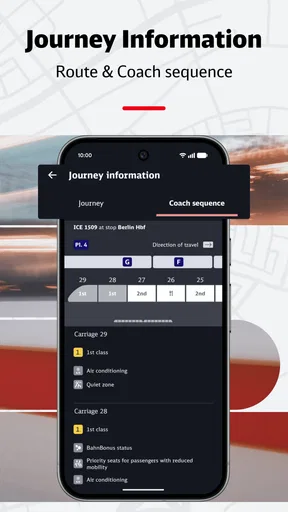
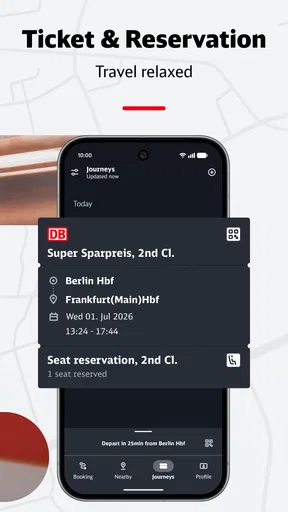
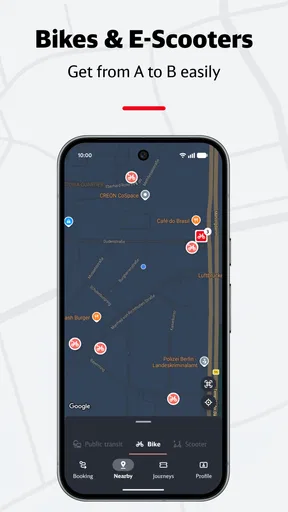
Our Review of DB Navigator
 Analysis by Appyee
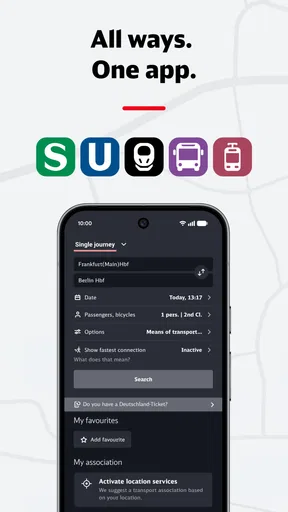
Planning a train journey is easy when everything lines up, but real travel rarely stays that tidy. A platform can change, a connection can become tight, or a regional service can run late just as you are walking through a crowded station. I found DB Navigator most useful in those moments because it brings journey planning, ticket handling, and live travel information into one place instead of making me jump between a railway website, a map app, and a separate ticket wallet.
Developed by Deutsche Bahn, this free Travel & Local app is aimed at people using German rail and public transport. It also covers the Deutschlandticket, bikes, and e-scooters, so its usefulness goes beyond checking an intercity departure. The app has been around since March 30, 2010, and its current version is 26.15.0. With a 4.5 average from around 337 thousand ratings and over 50 million installs, it is clearly a familiar tool for many travelers, although popularity does not make every journey frictionless.
How DB Navigator feels when the network is doing the work
I find the app most useful when I’m already moving and need to make a decision rather than simply browse a timetable. In this section, I’ll look at how live information fits into that moment, including why a little preparation can make the next step feel calmer. It also sets up the practical question of what to do when a connection starts looking uncertain.
Live information is the reason to open it during a journey
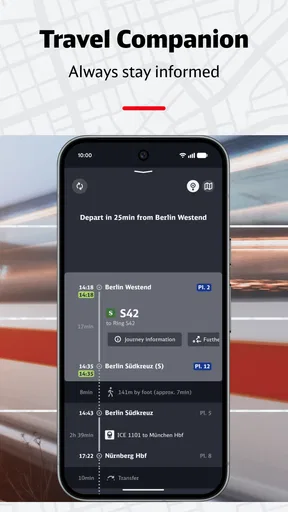
The strongest part of my experience was the way the app becomes more valuable after the trip has started. Before departure, a normal timetable search may be enough. Once I am at the station, however, I want to know whether the service is still running as planned, whether a connection deserves attention, and whether the route shown earlier has changed. That is where the real-time side matters.
This also explains why connectivity shapes the experience so strongly. A journey search, ticket action, or live update depends on the app being able to communicate with its service. In a station with reliable mobile data, the process feels direct: search, inspect the result, and react to the latest information. In a crowded underground area or a rural stretch with weak reception, the same workflow can feel much less dependable because the information I need may take longer to appear.
I would not treat the application as a magic shield against every travel problem. It is a useful window onto current journey information, not a replacement for paying attention to station announcements, platform displays, and staff instructions. When a disruption develops quickly, those other sources can sometimes communicate the change before I have refreshed the app.
A practical example: a tight connection after work
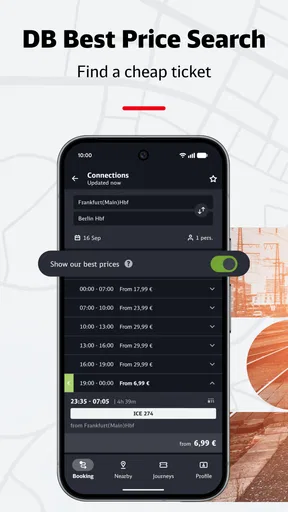
Imagine leaving work with a regional train followed by a longer-distance service. I would use DB Navigator before leaving to compare the available departures, then check the selected journey again while walking to the station. If the first train is delayed, the important question is not simply whether the original itinerary still appears on screen. I need to look at the remaining connection and decide whether a later option is less stressful.
The app is particularly helpful when I resist the temptation to plan only around the fastest result. A connection with a very short transfer may look attractive in a search list, but it leaves little room for a late arrival or a long walk across the station. I prefer using the journey planner to compare a quick option with a slightly slower one, especially when I am carrying luggage or traveling with someone unfamiliar with the station.
That is one of the less obvious strengths here: the planner is not only for finding a route. It gives me a way to make a risk decision. A traveler who values certainty can choose a more forgiving connection, while someone with a flexible schedule can prioritize speed. The app does not make that judgment for me, but it puts the alternatives close enough to compare.
Tickets and the Deutschlandticket in the same travel routine
Having ticket-related tasks alongside the planner is convenient because it reduces the number of places I need to check before boarding. I can think about the journey and the travel document as part of one routine rather than treating them as separate jobs. That is especially useful for people who make several trips and do not want to reconstruct each itinerary from scattered messages or browser tabs.
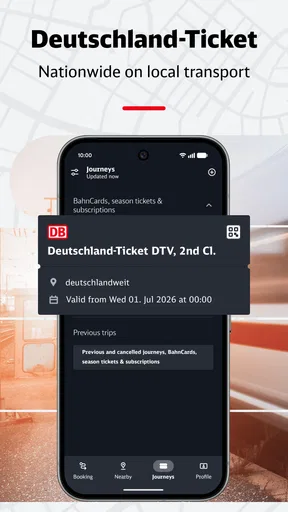
The Deutschlandticket is an important part of the app’s appeal for regular public transport users. It makes DB Navigator more relevant to everyday regional travel, not just occasional long-distance trips. Someone commuting across local and regional services may find the app more useful than a railway-only timetable tool because the ticket and route-planning context are connected.
There is still a responsibility on the traveler to understand what the selected ticket covers and to check the journey details before departure. A convenient interface can make purchasing feel quick, but speed is not a substitute for reading the route, service type, and travel conditions shown during the process. I especially recommend slowing down when combining different kinds of transport or when a journey crosses areas with unfamiliar local services.
Why the phone context changes the experience
On a desktop, I usually have more space to compare several journeys at once. On a phone, DB Navigator is better suited to quick decisions made while standing on a platform, walking through a station, or sitting in a train. That mobile focus is useful, but it also encourages shorter glances and faster choices. Small details can be easy to overlook when I am distracted by luggage, crowds, or a countdown to departure.
My preferred habit is to search calmly before leaving, then use the app during the journey mainly for confirmation and changes. That reduces the amount of typing and scrolling I need to do when reception is poor or I am in a hurry. It also gives me a reference point: if the live result changes, I can compare it with the plan I already understood.
For a first-time visitor to Germany, the app can be more helpful than relying only on a general map application. A map service may show a route, but DB Navigator is closer to the railway journey itself, especially when the question involves a specific train, a ticket, or a service disruption. On the other hand, a local transport app may be better for highly detailed city information in one municipality, particularly if the traveler needs neighborhood-level bus or tram guidance rather than a broader rail journey.
Bikes and e-scooters make short links easier to consider
The inclusion of bikes and e-scooters gives the planner a wider everyday role. A train station is rarely the true beginning or end of a trip; there is often a walk, a cycle, or a short ride between the platform and the final destination. Having those options visible in the same travel environment can help me think about the whole journey rather than stopping at the station entrance.
I see this as most useful for solving the last part of a trip. If a destination is awkward to reach on foot, a bike or e-scooter option may change which train connection makes sense. It can also help a commuter compare a direct but slower public transport route with a train followed by a short personal-mobility leg.
The trade-off is that these options add another layer to the decision. Availability, local rules, weather, parking, and battery or vehicle condition can all affect the final leg. I would use the app to identify a possibility, then check the details before depending on it for an important appointment. A bicycle or scooter is a useful supplement, not a guarantee that the last kilometer will be effortless.
What happens when reception becomes the weak link
The most important limitation is also the easiest to underestimate: a connected travel app is only as comfortable as the connection available at the moment I need it. Stations can be busy, underground sections can be awkward, and a train may pass through areas where data service is inconsistent. If I wait until the last second to search, buy, or inspect a change, I am putting too much pressure on the network.
My practical solution is simple. I prepare important details while I have a stable connection, keep the departure and destination in mind, and avoid assuming that a fresh update will always load instantly. I also allow time before boarding for a ticket-related task instead of starting it as the doors are about to close. This is not a criticism unique to DB Navigator; it is the basic trade-off of using a live travel service on a phone. Still, the app makes that trade-off very noticeable because its best information is the information that changes.
I would be cautious about presenting a screenshot or an old search result as proof that a journey is still valid. A saved visual reference may help me remember a train number or departure time, but it cannot replace checking the current situation when I regain a connection. For a critical trip, I treat live information as something to verify, not something to assume.
Recovering from a missed or changed connection
When a journey goes wrong, the value of a planner is measured by how quickly it helps me form a new plan. DB Navigator is useful here because I can return to the route rather than beginning from scratch with a completely different service. I can search again from my current station, compare later departures, and decide whether continuing by rail still makes sense.
The recovery process works best when I first identify my actual position and remaining destination. It is easy to keep staring at the original itinerary even after the situation has changed. I prefer to treat the original search as context, then perform a fresh search using the station where I will really be able to board. That small change in habit prevents me from chasing a connection that has already become unrealistic.
There is a human side to this as well. In a disruption, I may need to choose between arriving later, changing at a different station, or asking staff for help. The app can support the comparison, but it cannot know whether I am traveling with a child, carrying heavy bags, or willing to walk across a large station. I value it as a decision aid, not as an automatic recovery system.
For that reason, the app is not the right sole tool for someone who wants every travel problem handled without personal judgment. Travelers who need accessible assistance, special boarding arrangements, or highly specific local guidance should also use the appropriate railway or station support channels. The planner can show a route, but a route on a screen is not the same thing as practical assistance on the ground.
Using it without wasting mobile data
Because the app combines searches, live updates, tickets, and mobility choices, I would use it deliberately when mobile data is limited. I do not repeatedly refresh a journey just because I am anxious. Instead, I check before leaving, refresh when there is a genuine reason, and look at station displays while waiting. That gives me current information without turning every minute of a trip into a data request.
It also helps to avoid unnecessary browsing while standing in a poor-signal area. If a search is taking too long, I move to a place with better reception or use the information already available around me rather than tapping the same control repeatedly. This is a small but practical improvement: repeated attempts do not create a better connection, and they can make a rushed situation feel worse.
Travelers with limited data should prepare the basic journey while connected to dependable Wi-Fi or mobile service, then keep the later checks focused. I would also make sure the phone has enough battery, since a travel planner and ticket tool are less useful when the device is nearly empty. That advice sounds obvious, but the app encourages people to keep the whole journey on the phone, so battery planning becomes part of travel planning.
Compared with a printed timetable, DB Navigator offers much more flexibility when services change, but paper does not depend on a signal or battery. Compared with a general map app, it is more focused on Deutsche Bahn journeys, tickets, and railway-related updates, while a map app may be more comfortable for walking directions and broad local discovery. I would use them together when necessary rather than expecting one tool to be perfect at every stage.
Who will get the most from it
I would recommend DB Navigator to commuters, visitors moving between German cities, and anyone who regularly combines regional transport with longer rail journeys. It is also a sensible choice for Deutschlandticket users who want their everyday travel planning and ticket context in one application. The free price makes it easy to try without turning the decision into a financial commitment, and its Everyone age rating makes it suitable for a broad range of travelers.
It is less compelling for someone who only needs a simple walking route, a single city’s bus map, or an occasional printed schedule. A local transport app may offer more specialized detail in one city, while a general map tool may be quicker for a short walk. I would also hesitate to rely on DB Navigator alone if my trip depends on constant connectivity, complex assistance needs, or a highly unusual combination of transport modes.
The app’s large user base suggests that it has become a standard travel companion for many people, but my recommendation is based on the workflow rather than the install count. Its real advantage is the combination of planning, ticket handling, live travel awareness, and additional short-distance mobility options. Its real weakness is that the most valuable parts are tied to timely information, so poor reception and rushed use can expose its limits.
My connectivity verdict
After using DB Navigator as a travel companion, I see it as a practical, focused app rather than a complete answer to every transport question. It is at its best when I prepare a journey with a stable connection, check the live situation at sensible moments, and use the results to make my own decisions. The experience becomes less comfortable when I postpone everything until boarding or expect the phone to solve a disruption without help from station information and common sense.
The best habit is to use DB Navigator early, then use it selectively while moving. That approach makes the network-dependent parts feel manageable and leaves room for the realities of travel: crowded platforms, weak reception, changing plans, and the need to ask a person when a screen is not enough.
For a free app from Deutsche Bahn, it offers a convincing everyday package for rail and regional travel. I would install it before a German train trip, especially if I needed the Deutschlandticket, wanted live journey information, or expected to combine trains with bikes or e-scooters. I would simply keep a backup mindset: check the station, allow time for the connection, and never confuse a convenient digital plan with a guarantee that the journey will run perfectly.
That balance is why I would recommend it to a friend. DB Navigator can make a complicated rail day easier to understand, but it works best when the traveler remains involved. Its current reach, free access, and mature travel focus make it an easy first choice for many people, while its dependence on timely connectivity is a reminder to prepare before the platform gets busy.
Verdict
Strengths of DB Navigator
- Real-time updates help track delays, cancellations, and platform changes.
- Supports mobile tickets, reducing the need to print or collect paper tickets.
- Journey planning covers trains, buses, trams, and local transport in many regions.
- Saved connections make checking frequent routes faster.
- Accessibility details can help users find step-free travel options.
Limitations of DB Navigator
- Some regional transport data may be incomplete or unavailable.
- Ticket prices and booking rules can vary between operators.
- The app may feel complex for occasional travelers.
- Account or payment issues can interrupt the ticket purchase process.
- Service information depends on network coverage and current operator data.
Similar Picks in This Category
View All
Google Maps
Google LLC3.4

Google Maps Go
Google LLC4.1

Booking.com: Hotels & Travel
Booking.com Hotels & Vacation Rentals4.8

Google Earth
Google LLC3.8

Skyscanner Flights Hotels Cars
Skyscanner Ltd4.8

trivago: Compare hotel prices
trivago N.V.4.4
Frequently Asked Questions
What is DB Navigator, and what can I use it for?
DB Navigator is Deutsche Bahn’s official travel app for planning and managing journeys in Germany and, in many cases, across neighboring European countries. You can search train and public transport connections, compare departure times, check platform information, buy eligible tickets, save journeys, and receive notifications about delays or changes. It is particularly useful for combining long-distance trains with regional services and local transport options.
Can I buy train tickets directly through DB Navigator?
Yes, DB Navigator allows users to search for available connections and purchase many Deutsche Bahn tickets directly in the app. Depending on the route, you may find fares for ICE, IC, EC, regional trains, and selected local transport services. Before paying, carefully check the passenger details, travel date, route, and ticket conditions. Some special fares may have restrictions, and not every local operator or international journey supports mobile ticket purchases.
Does DB Navigator provide real-time delays and platform information?
DB Navigator offers live travel updates for many services, including delay estimates, cancellations, platform changes, and altered connections. Notifications can be especially helpful when a journey involves transfers. However, information may change quickly during disruptions, and updates are not always available immediately for every regional operator or local transport service. For important trips, it is sensible to check the connection again shortly before departure and follow station announcements.
Can I use DB Navigator without an internet connection?
You generally need an internet connection to search for current connections, purchase tickets, receive live disruption updates, and synchronize travel information. Once a ticket has been downloaded or saved in the app, it may remain accessible offline, although this can depend on the ticket type and account status. Screenshots may not be accepted as valid tickets, so open the official ticket view in the app and carry identification when required.
Is DB Navigator available for both Android and iPhone users?
DB Navigator is designed for both Android and iOS devices and can be downloaded through the official Google Play Store or Apple App Store. Compatibility, available features, and performance may vary depending on your operating system version, device, and the transport services used. Keeping the app updated is recommended because timetable data, ticket functions, security requirements, and notification features can change over time.
